


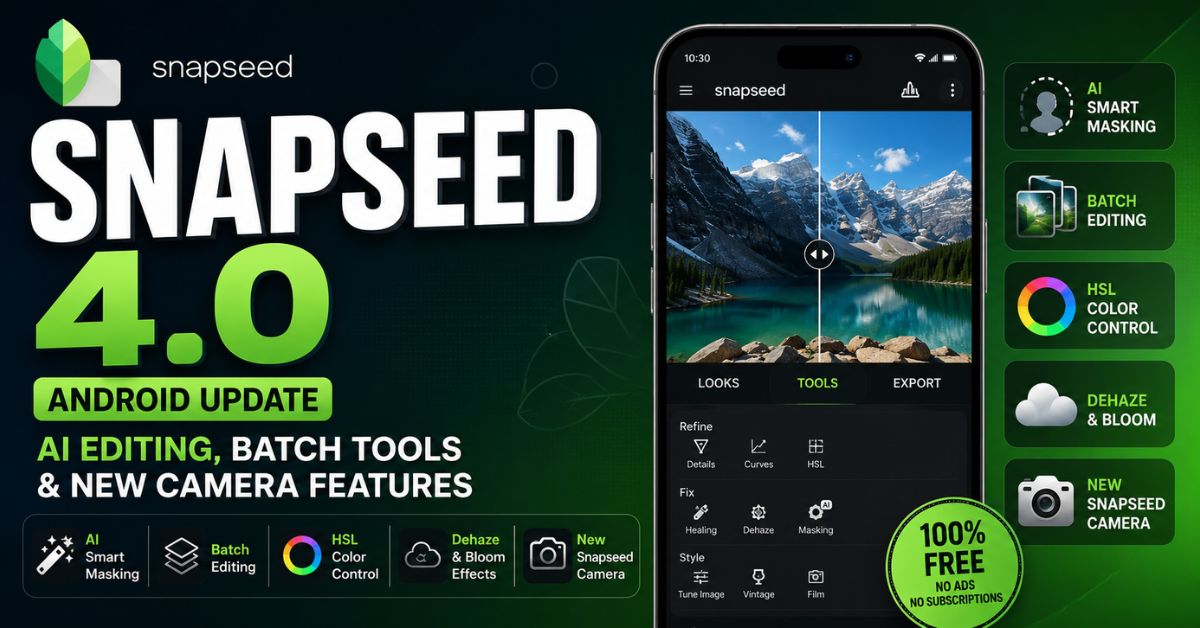
Snapseed 4.0 Update Overview
- Snapseed 4.0 officially started rolling out for Android on May 8, 2026, bringing the app to feature parity with the redesigned iOS version released earlier.
- The update introduces a completely redesigned interface with gallery-based navigation, categorized editing tools, pinned favorites, and dark or light theme toggles.
- A new built-in Snapseed Camera now allows users to capture photos with real-time film looks, manual controls, and non-destructive editing support.
- Google has added advanced features including AI Smart Masking, batch editing, HSL color controls, Dehaze, Bloom, Halation, and upgraded film simulations.
- Snapseed 4.0 remains completely free without ads or subscriptions, while the staged rollout means some Android users may still temporarily see version 2.22.
After years of uncertainty around the future of Google’s popular mobile photo editor, Snapseed has returned with its biggest Android update in recent memory. Snapseed 4.0 officially started rolling out on May 8, 2026, bringing a complete redesign, AI-powered editing tools, professional workflow improvements, and a new in-app camera system that changes how creators use the app on smartphones.
The update is especially important because Android users had been left behind after Apple devices received the major Snapseed 3.0 redesign in 2025. For almost two years, the Android version remained largely unchanged while the iOS version gained modern tools, film simulations, and interface improvements. With Snapseed 4.0, Google has finally brought Android users into the new generation of the app.
Snapseed has always been known as one of the few truly free professional-grade photo editing apps on mobile. Unlike many competitors, it still does not include subscriptions, ads, locked presets, or watermarks. That alone makes this update significant in a market where most photo editing apps now rely heavily on paid plans.
Snapseed 4.0 Brings the Biggest UI Redesign in Years
The first thing users will notice after updating to Snapseed 4.0 is the completely redesigned interface. Google has rebuilt the app around a cleaner and more modern editing workflow.
Earlier versions of Snapseed opened with a large “+” button and a minimal home screen. The new version replaces that with a gallery-style homepage that displays recently edited photos in a grid layout. The design feels closer to modern creator-focused apps and makes it easier to continue unfinished projects.
Navigation has also changed. Instead of scrolling through a long list of tools, the app now separates editing into three major sections:
- Looks
- Tools
- Export
Inside the Tools tab, editing options are grouped into categories such as Refine, Fix, and Style. This reduces clutter and makes the interface easier for beginners while still keeping advanced controls accessible.
One of the most useful additions is the new Favorites pinning system. Users can now pin frequently used tools to the top of the interface. For creators who repeatedly use Curves, Healing, HSL, or Brush adjustments, this saves time during editing sessions.
Google has also added faster access to dark mode and light mode switching, along with a live histogram overlay in the top corner. The histogram is especially useful for photographers working with exposure balance and RAW images.
Snapseed Camera Changes the Entire Editing Workflow
The headline feature in Snapseed 4.0 is the new Snapseed Camera.
Previously, Snapseed worked only as a post-processing app. Users captured photos using their phone camera and later imported them into Snapseed for editing. The new built-in camera changes that approach completely.
Users can now shoot photos directly inside Snapseed while applying film looks, custom presets, and color styles in real time. This turns Snapseed into a hybrid camera and editing platform.
The camera includes a Pro Mode with manual controls for:
- ISO
- Shutter Speed
- Focus
This places Snapseed closer to advanced photography apps that traditionally focused on manual shooting controls.
Another major improvement is non-destructive capture. Even when users shoot with filters or film styles enabled, Snapseed preserves the original image data underneath. This means creators can later remove effects, re-edit the image, or apply completely different looks without losing quality.
For mobile photographers, travel creators, Instagram users, and YouTube thumbnail designers, this creates a much faster workflow.
Smart Masking and AI Editing Become a Core Part of Snapseed
Artificial intelligence is now deeply integrated into Snapseed 4.0.
The most important AI feature is Smart Masking. With a single tap, the app can automatically isolate subjects, skies, backgrounds, or objects for selective editing. Instead of manually brushing masks around hair, faces, or buildings, users can apply adjustments directly to detected regions.
This brings Snapseed closer to Adobe Lightroom and other premium editing platforms that already use AI masking systems.
Google says the feature is optimized for newer smartphone processors with dedicated AI hardware. Devices using flagship chipsets, including recent Snapdragon and Tensor processors, are expected to process masks faster. Mid-range phones still support the feature, although detection may take slightly longer during complex edits.
The app also introduces contextual AI suggestions. Snapseed can now analyze the content of a photo and recommend editing tools automatically. Portrait images may trigger skin and lighting recommendations, while architecture photos can surface perspective or structure tools.
The gallery itself has become smarter too. The new homepage reportedly uses on-device AI recognition to help users search photos using terms like “food,” “fashion,” “nature,” or “cricket.” This removes the need for manual tagging in large photo libraries.
Batch Editing Finally Comes to Snapseed
One of the most requested features in Snapseed history has finally arrived.
Snapseed 4.0 now supports batch editing. Users can copy edits or styles from one image and apply them across multiple photos simultaneously.
For professional creators, bloggers, wedding photographers, and social media managers, this dramatically speeds up workflow efficiency. Instead of manually editing every image in a set, creators can now maintain visual consistency with a single style transfer.
This is especially useful for:
- Instagram carousels
- Website feature graphics
- Product photography
- Event coverage
- Travel albums
- Film-inspired editing sets
Combined with export presets, batch editing positions Snapseed as a more serious productivity tool rather than just a casual filter app.
New HSL, Dehaze, Bloom, and Film Tools Add Professional Controls
Snapseed 4.0 introduces several editing tools that users have traditionally associated with desktop software or subscription-based apps.
The new Color HSL tool gives creators precise control over hue, saturation, and luminance for individual colors. This is useful for correcting skies, enhancing greenery, adjusting skin tones, or creating cinematic grading effects.
The Dehaze tool is another major addition. It can recover detail from foggy, smoky, or washed-out images with a single adjustment slider.
Google has also added Bloom and Halation effects. These tools simulate analog film behavior by creating glow around highlights and bright light sources. Film photographers and cinematic content creators will likely use these effects heavily for vintage aesthetics.
The updated Film section includes new emulations inspired by historical film stocks. These presets appear designed to compete with the growing popularity of retro photography apps and nostalgic camera styles.
Many creators in India are already comparing the cinematic presets to color grading commonly seen in contemporary South Indian films. High contrast, saturated tones, and warm highlight rendering appear to match current visual trends in Tamil and Telugu cinema.
RAW Editing and Metadata Controls Improve Professional Workflow
Snapseed has long supported RAW image editing, but the 4.0 update expands professional workflow features further.
Users now get improved metadata controls during export. IPTC and XMP handling allows photographers and publishers to manage copyright information, creator details, and image data more efficiently.
Export presets can also automatically resize photos, preserve specific EXIF information, or remove unnecessary metadata for web publishing.
This is important for digital publishers, SEO-focused creators, bloggers, and media websites that regularly optimize images for search engines and faster page loading.
For creators working on WordPress sites, Google Discover traffic, or feature graphics, the faster export workflow could become one of the most practical reasons to switch back to Snapseed.
Snapseed 4.0 Performance on Android Phones
Early impressions suggest that Snapseed 4.0 remains relatively lightweight despite the new AI features.
On flagship phones, AI masking and RAW processing appear nearly instant. Mid-range devices may take slightly longer during advanced edits or batch exports, but the app still performs better than many heavier editing platforms.
Importantly, Google has managed to keep Snapseed free without adding subscription restrictions. That alone gives the app a major advantage against competing editors that increasingly lock advanced tools behind monthly payments.
The rollout is currently staged through the Google Play Store, meaning some users may still see the older 2.22 version temporarily depending on region and device compatibility.
Why Snapseed 4.0 Matters in 2026
Snapseed once looked like a forgotten Google app. For years, updates were minimal, and many users assumed Google had quietly abandoned the platform.
The sudden revival beginning with the iOS redesign in 2025 surprised the mobile photography community. Now, with Android finally receiving the full redesign and feature expansion, Snapseed has re-entered the conversation as one of the strongest free photo editors available on smartphones.
The timing is also important. Mobile creators increasingly want tools that combine AI editing, cinematic styles, and fast publishing workflows without expensive subscriptions. Snapseed 4.0 directly targets that demand.
For Android users searching for Snapseed 4.0 features, Snapseed 4.0 Android update, Snapseed AI editing, Snapseed batch editing, Snapseed Camera, Snapseed vs Lightroom, Snapseed 4.0 download, and best free photo editor 2026, this release is likely to become one of the most discussed mobile photography updates of the year.